 Menu
Menu
On this page
SOC 2 Security uses the AICPA Common Criteria (CC1–CC9). CC6 covers logical and physical access; CC7 covers detecting, evaluating, and responding to security events. Common implementations include MFA, role-based access, periodic access reviews, vulnerability management, centralized logging, and a tested incident-response process. The criteria are principles-based: they do not mandate a SIEM, quarterly reviews, or one fixed technology stack.
What Are SOC 2 Security Controls?
SOC 2 Security is evaluated against the AICPA Common Criteria — nine series (CC1 through CC9) defined in TSP Section 100, the 2017 Trust Services Criteria with revised points of focus (2022). Security is the only mandatory SOC 2 category. The criteria are not a prescribed control catalog: your organization designs controls for its risks, and the auditor tests those controls against the applicable criteria. CC6 spans eight sub-criteria governing access; CC7 spans five governing the detection, evaluation, response, and recovery process.
The standard itself has not changed for 2026: the AICPA has not issued a new SOC 2 version. The governing document is still TSP Section 100, the 2017 Trust Services Criteria with Revised Points of Focus (2022). What has changed is how auditors apply it. The 2022 points-of-focus update told organizations to evaluate access by user type (employee, contractor, vendor, partner) and to address device recovery for laptops and phones. Through 2025–2026, auditors have extended CC6 reasoning to non-human and AI-agent identities (more below). For the full set of nine series, see our SOC 2 controls list and SOC 2 Trust Services Criteria guides.
CC6 and CC7 answer two practical questions: who can reach the system, and how does the organization detect and respond when something changes or goes wrong? The rest of this page separates each criterion’s objective from implementation examples and evidence an auditor may test.
| Criterion | Objective | Common implementation | Evidence example |
|---|---|---|---|
| CC6.1 | Restrict logical access at system boundaries | Firewall, WAF, network segmentation | Approved rules and network diagram |
| CC6.2 | Authorize new and changed access | Provisioning workflow | Approved access tickets |
| CC6.3 | Maintain access appropriate to roles | RBAC and periodic access review | Role matrix and dated review |
| CC6.4 | Restrict physical access | Badge or visitor controls; cloud-provider inheritance | Access logs or subservice report |
| CC6.5 | Protect credentials | MFA and secrets management | Enforcement settings and key inventory |
| CC6.6 | Control access outside system boundaries | Vendor, contractor, VPN, and API access controls | Third-party access inventory |
| CC6.7 | Control transmission, movement, and removal of data | TLS, approved transfer methods, DLP where relevant | TLS settings and transfer policy |
| CC6.8 | Prevent or detect malicious software | EDR, MDM, patching | Coverage and remediation reports |
| CC7.1 | Detect configuration changes and new vulnerabilities | Configuration and vulnerability monitoring | Scan results and change alerts |
| CC7.2 | Monitor for anomalies | Centralized logging and alerting | Alert rules and reviewed events |
| CC7.3 | Evaluate security events | Triage and severity workflow | Incident or event tickets |
| CC7.4 | Respond to identified incidents | Incident-response plan and exercises | Dated exercise or incident records |
| CC7.5 | Recover and improve after incidents | Recovery and corrective-action process | Recovery evidence and post-incident actions |
These are examples, not fixed AICPA requirements. The right control and cadence depend on the risk assessment, system commitments, and population the auditor is testing.
CC6 — Logical and Physical Access Controls spans eight sub-criteria (CC6.1 through CC6.8). It covers everything from network perimeter defenses to how you manage SSH keys and whether your server room has a badge reader. It enforces least privilege across every layer of your environment.
CC7 — System Operations spans five sub-criteria (CC7.1 through CC7.5). It governs how you detect, evaluate, and respond to security events. Strong access controls do not offset a material monitoring or response gap, but the opinion impact depends on the exception’s nature and extent.
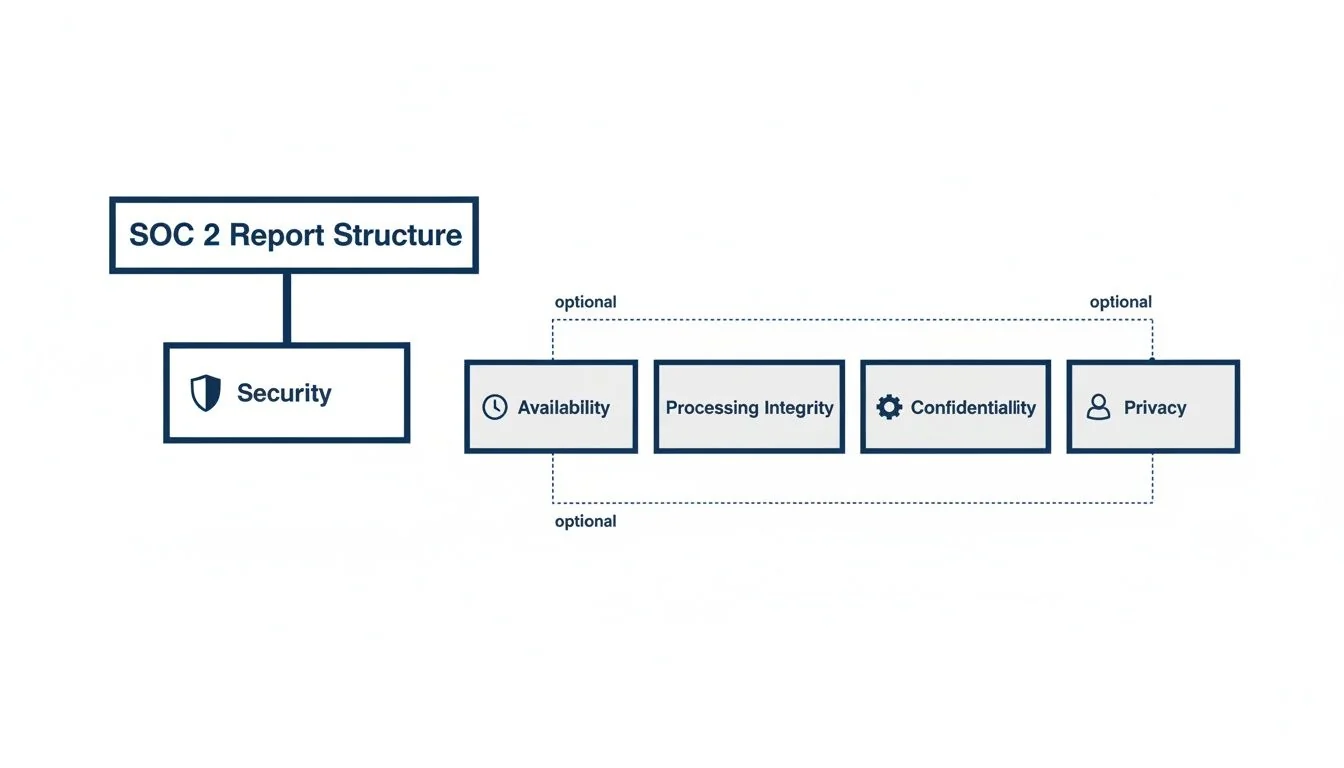
This diagram shows how the Security category anchors the SOC 2 report structure.
What Does CC6 (Logical and Physical Access Controls) Require?
CC6 is the largest criterion in the Common Criteria set, spanning eight sub-criteria (CC6.1 through CC6.8) that govern network perimeter defenses, identity provisioning, role-based access, physical facility controls, credential protection, third-party access, data transmission security, and malware prevention. Auditors test each sub-criterion independently, and a gap in any layer can result in an exception.
CC6 is the largest criterion in the Common Criteria set. Its eight sub-criteria move systematically from the network perimeter inward to endpoints, credentials, and data transmission. Weaknesses at any layer create exposure — and auditors test each one.
CC6.1 — Logical Access Security at the System Boundary
What it requires: The entity implements logical access security measures to protect against threats from sources outside system boundaries. This means your perimeter defenses must be documented, configured, and operating.
Controls that satisfy it:
- Network firewalls with documented rule sets reviewed at least annually. Every open port must have a business justification. Rules permitting broad inbound access (e.g.,
0.0.0.0/0on SSH) are immediate findings. - Web Application Firewall (WAF) for any customer-facing application. AWS WAF, Cloudflare, or equivalent — configured with OWASP rule sets and logging enabled.
- Intrusion detection/prevention systems (IDS/IPS) or equivalent cloud-native capabilities (AWS GuardDuty, Azure Defender) generating alerts on anomalous traffic patterns.
- Network segmentation separating production from development and corporate environments. A flat network where a compromised developer laptop can reach production databases fails CC6.1.
Evidence auditors test:
- Firewall rule sets with review sign-off (dated within the last 12 months)
- WAF configuration and sample block/alert logs
- Architecture diagram showing network segmentation
- IDS/IPS alert policy documentation and sample alerts
CC6.2 — Restricting New User Access to Authorized Activities
What it requires: New internal and external users’ access is restricted to authorized and necessary activities. This is the provisioning side of the access control lifecycle.
Controls that satisfy it:
- Formal access request workflow: Every new user — employee, contractor, or vendor — must go through a documented request-and-approval process before receiving access. A Jira ticket or ServiceNow workflow with manager approval satisfies this. A Slack message does not.
- Onboarding checklist: HR triggers access provisioning for new employees; IT provisions based on role, not ad-hoc requests. The checklist must be retained as evidence.
- Least privilege by default: New accounts should start with minimal access. Elevated permissions require a separate, documented request.
- Contractor and vendor access: Third parties must have time-limited access that expires automatically or is reviewed on a fixed schedule. Shared credentials fail this criterion.
Evidence auditors test:
- A sample of new user provisioning tickets from the audit period (sample size is the auditor’s judgment call based on population size and risk; 10–25 is a commonly observed range)
- Evidence of manager approval in each sample ticket
- Proof that accounts were provisioned after — not before — approval
- For Type 2: consistency across the full observation period, not just recent months
CC6.3 — Role-Based Access with Appropriate Permissions
What it requires: Role definitions include appropriate access restrictions. This is the design and maintenance of your RBAC model.
Controls that satisfy it:
- Documented role definitions: Each role (e.g., “Developer,” “Support Engineer,” “Finance”) must have documented permissions. Auditors will compare the documented permissions to the actual permissions in your IAM system.
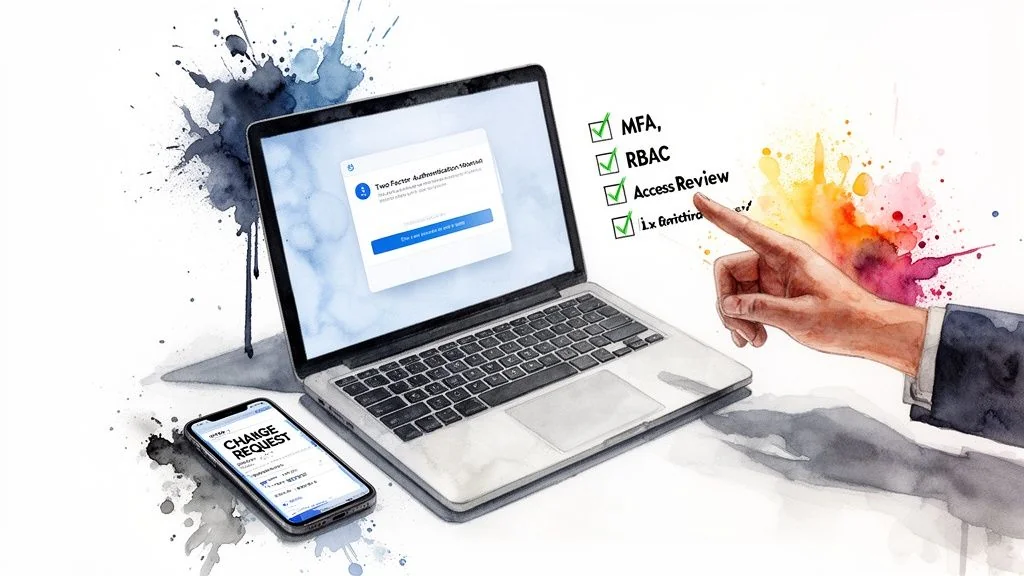
- Periodic access reviews: Define a review cadence from system risk, contractual commitments, and your policy. Quarterly reviews are common for privileged or production access. Keep the population, reviewer, decisions, date, and completed remediation as evidence.
- Segregation of duties (SoD): Roles that create a conflict of interest must be separated. The canonical example: the same person should not have the ability to both approve financial transactions and execute them. For engineering teams: the developer who writes code should not be the only person who approves it for production deployment.
- Privileged access management (PAM): Admin and root-level access must be limited to named individuals with documented business need. Shared admin accounts are a finding.
Evidence auditors test:
- Role definition documentation with permissions matrix
- Access review records for each in-scope system (with dates, reviewer names, and sign-off)
- IAM exports showing current user-to-role assignments
- Evidence of terminated employee access revocation (see CC6.2 overlap)
The most common CC6.3 exception: Access reviews that are performed once and never repeated, or reviews performed but not documented with sufficient detail to demonstrate that actual permissions were evaluated (not just list verified).
CC6.4 — Physical Access Restricted to Authorized Personnel
What it requires: Physical access to facilities and protected information assets is restricted to authorized personnel.
For most SaaS companies using cloud infrastructure (AWS, GCP, Azure), physical access controls are inherited from the cloud provider — auditors accept this when properly documented. This criterion still applies to your own offices, where equipment, workstations, and potentially sensitive printouts exist.
Controls that satisfy it:
- Cloud provider SOC 2 reports: Obtain the SOC 2 (or ISO 27001) reports from your cloud provider(s) annually. Document that physical data center security is a subservice organization control. This passes CC6.4 for production infrastructure.
- Office physical access: Badge readers or key card access for office entry (or documented visitor policy if your office lacks electronic controls). Visitor logs for any data-center-equivalent space.
- Server room / network closet controls: If you have on-premise networking equipment, the room must have locked access, a log of entry, and security camera coverage or equivalent.
- Clean desk / screen lock policy: Documented policy requiring screen locks and no sensitive data left unattended. Auditors will ask about this during interviews.
Evidence auditors test:
- Cloud provider SOC 2 report (current year) with physical security controls noted
- Office access control documentation or badge access logs
- Visitor policy or visitor log
- Physical security policy document
CC6.5 — Protection of Logical Access Credentials
What it requires: Logical access credentials are protected (identification, authentication, and authorization mechanisms).
This sub-criterion covers MFA, password policy, and secrets management. It is among the most-tested criteria in the entire CC series.
Controls that satisfy it:
- Multi-Factor Authentication (MFA): MFA must be enforced — not just available — on all access to production systems, code repositories, cloud consoles, and identity providers (Okta, Azure AD, Google Workspace). Auditors request screenshots of MFA enforcement policies and verify they are configured to prevent bypass. Advisory-mode MFA (where users can skip) is a finding.
- Password policy: Minimum length (12+ characters), complexity requirements, prohibition on reuse of the last 12 passwords. Enforced at the identity provider level, not just documented in a policy.
- Secrets management: Production credentials, API keys, and certificates must not be stored in plaintext — not in code repositories, not in
.envfiles committed to version control, not in Slack. Use a secrets manager (HashiCorp Vault, AWS Secrets Manager, GCP Secret Manager). Auditors commonly ask for evidence that secrets rotation is automated or reviewed. - SSH key management: SSH keys to production servers must be inventoried, attributed to named individuals, and rotated when personnel change. Stale keys belonging to departed employees are a finding.
- Privileged session logging: For privileged access to production, session logging provides an audit trail of what was done.
Evidence auditors test:
- Screenshots of MFA enforcement policy in your identity provider
- Password policy configuration (not just the policy document — the actual system setting)
- Secrets management tool configuration and evidence of use
- SSH key inventory (or equivalent for certificate-based auth)
2026 watch — non-human and AI-agent identities: Auditors now extend CC6.5 and CC6.6 reasoning to service accounts and AI agents. The expectation is distinct identity separation — the agent identity is separate from the service identity, which is separate from the human user at the top of the chain — so every privileged action stays attributable to an accountable individual. Collapsing an agentic workflow into a single shared
ai-service-accountcredential is the canonical CC6 failure mode in 2026: it makes the audit trail unreviewable and scoped revocation impossible. Issue one identity per agent persona, scope each tool credential separately, and use short-lived tokens or just-in-time access (per Teleport’s 2026 AI-agent SOC 2 analysis).
CC6.6 — Managing Logical Access to Assets Outside System Boundaries
What it requires: Logical access to assets outside the system boundary (including third-party assets and cloud providers) is managed and restricted to authorized users.
Controls that satisfy it:
- VPN for remote access: Remote workers and contractors accessing production environments must use a VPN. Split tunneling configurations should be reviewed — untunneled traffic to production is a gap.
- Third-party access management: Vendors and contractors with access to your systems must be inventoried. Access must be time-limited, scoped to minimum necessary, and revoked immediately upon engagement end.
- Vendor portal and SaaS application inventory: Maintain an inventory of third-party tools with access to customer data or production systems. Each must have a designated owner and an annual review.
- API access control: External API keys must be issued with minimal scope, tracked, and rotated. Wildcard or admin-scope keys issued to third parties are a finding.
Evidence auditors test:
- VPN policy and configuration evidence
- Third-party access inventory with access review records
- Evidence of offboarding for departed contractors
- API key inventory with scope documentation
CC6.7 — Restricted to Authorized Users for Transmission
What it requires: The transmission, movement, and removal of information is restricted to authorized internal and external users and processes.
Controls that satisfy it:
- TLS/SSL in transit: Encrypt customer data in transit using protocols supported by your security policy and risk assessment. TLS 1.2 or later is a common baseline in 2026, but the TSC does not prescribe a protocol version. Auditors may inspect certificates and endpoint configuration.
- Email encryption policy: Sensitive data must not be transmitted via unencrypted email. Document a policy and, where technically feasible, implement DLP controls to enforce it.
- Encrypted data transfers: File transfers containing customer or sensitive data must use SFTP, HTTPS, or equivalent encrypted protocols. FTP is a finding.
- Data loss prevention (DLP): For organizations handling highly sensitive data, DLP controls detect and block unauthorized transmission of sensitive data outside the organization.
- Removable media policy: Document controls over USB drives and removable storage. Many organizations simply prohibit use for production data.
Evidence auditors test:
- SSL/TLS certificate and configuration evidence for all customer-facing endpoints
- Email and data transfer policy documentation
- DLP policy or tool configuration (if applicable)
CC6.8 — Managing Malicious Software Threats
What it requires: Controls to prevent or detect and act upon the introduction of unauthorized or malicious software.
Controls that satisfy it:
- Endpoint Detection and Response (EDR): Deploy EDR (CrowdStrike, SentinelOne, Microsoft Defender for Endpoint) on all company-managed endpoints. Auditors want evidence of coverage — typically an export showing all managed devices with EDR enrolled.
- Endpoint management (MDM): Use a Mobile Device Management (MDM) tool (Jamf, Intune) to enforce security baselines: disk encryption (FileVault/BitLocker), screen lock, automatic updates. Evidence of compliance vs. non-compliant device count is tested. The 2022 revised points of focus explicitly call for device recovery procedures (remote wipe and retrieval of lost or stolen laptops and phones), so document how a lost device is locked, wiped, and recovered.
- Patch management: Documented policy for applying security patches within a defined SLA (commonly: critical patches within 30 days, high within 60 days, medium within 90 days). Auditors sample specific CVEs published during the audit period and verify they were patched within SLA.
- Software allowlisting or code signing: For production servers, only approved software should execute. Container environments with image signing (Docker Content Trust, Sigstore) satisfy this at the infrastructure layer.
- Vulnerability scanning: Regular scanning of endpoints and production systems using tools like Qualys, Tenable, or Wiz. Scan results and remediation tracking are core evidence.
Evidence auditors test:
- EDR tool enrollment report (all endpoints, enrollment date, last check-in)
- MDM compliance report showing encryption and lock screen enforcement
- Patch management policy with defined SLAs
- Vulnerability scan results with remediation ticket evidence
What Does CC7 (System Operations) Require?
CC7 covers the detection and response side of security operations, spanning five sub-criteria (CC7.1 through CC7.5): detecting changes and vulnerabilities, monitoring anomalies, evaluating security events, responding to incidents, and recovering from them. A material CC7 deficiency can affect the auditor’s opinion; a less material exception may instead appear in the test results or other communication.
Strong access controls do not compensate for missing monitoring and response evidence. The opinion impact depends on the nature, extent, and materiality of any exception.
CC7.1 — Detection and Monitoring Procedures
What it requires: The entity uses detection and monitoring procedures to identify (1) changes to configurations that result in the introduction of new vulnerabilities, and (2) susceptibilities to newly discovered vulnerabilities.
Controls that satisfy it:
- SIEM (Security Information and Event Management): Aggregate logs from all critical systems — cloud infrastructure, identity provider, application, endpoints, network — into a centralized SIEM (Splunk, Datadog, Elastic Security, AWS Security Hub). Auditors verify that logs from all in-scope systems flow into the SIEM and that the retention period covers the audit window. See our SOC 2 logging and monitoring controls guide for the full log-source and retention checklist.
- Log aggregation and retention policy: Define what is logged, where it is stored, and for how long. Retention should cover the audit period and your incident-investigation needs; hot/cold tiers are an implementation choice, not an AICPA rule.
- Actionable alerting: A SIEM or other monitoring stack should surface security-relevant events rather than only store logs. Examples include failed-login thresholds, privilege escalation, unusual access patterns, and configuration changes.
- Configuration management / drift detection: Infrastructure-as-code (Terraform, CloudFormation) with drift detection alerts when production configuration diverges from the approved baseline.
- Vulnerability scanning cadence: Scan production infrastructure on the cadence defined by risk and policy, and track findings through remediation. Monthly scanning is common, but not a universal TSC frequency.
Evidence auditors test:
- SIEM architecture diagram showing log sources
- Log retention policy documentation
- Sample alert rules with thresholds
- Vulnerability scan schedule and recent scan outputs
CC7.2 — Monitoring for Anomalies and Indicators of Compromise
What it requires: The entity monitors system components and the operation of those controls for anomalies that are indicative of malicious acts, natural disasters, and errors affecting the entity’s ability to meet its objectives.

Controls that satisfy it:
- Behavioral analytics / anomaly detection: Beyond rule-based alerting, use machine learning or behavioral baseline tools (AWS GuardDuty anomaly mode, Datadog anomaly monitors, Crowdstrike Falcon Insight) to detect deviations from normal patterns — unusual data egress volumes, access at atypical hours, logins from new geographies.
- Alert tuning and review: Documented evidence that your alert rules are reviewed and tuned periodically. Auditors look for evidence that alerts are actionable — a SIEM generating 10,000 low-fidelity alerts per day with no triage process is a control weakness.
- On-call rotation: Define an on-call rotation with documented coverage. Alerts must reach a human within a defined SLA. Evidence: PagerDuty rotation schedules, or equivalent.
- Cloud provider threat intelligence: AWS GuardDuty, Azure Defender, or GCP Security Command Center provide threat intelligence feeds that surface known malicious IPs and TTPs. These should be enabled and integrated into your alerting workflow.
Evidence auditors test:
- SIEM alert rule configuration (sample of high-priority rules)
- On-call rotation schedule and escalation policy
- Evidence of alert response (incident tickets tied to SIEM alerts during the audit period)
- Threat intelligence feed configuration
CC7.3 — Evaluation of Security Events
What it requires: Security events are evaluated to determine if they should be classified as security incidents.
This sub-criterion covers triage and classification — the bridge between detection (CC7.2) and response (CC7.4).
Controls that satisfy it:
- Incident classification criteria: A documented matrix defining what constitutes a security incident, tiered by severity (P1/Critical, P2/High, P3/Medium). Without documented classification criteria, auditors cannot confirm that your team consistently applies the same standard.
- Triage workflow: A defined process for investigating an alert: initial assessment, escalation criteria, who gets notified at each severity level. This can be embedded in your incident response plan or maintained as a runbook.
- Ticket tracking: Every security event requiring evaluation must be tracked in a ticketing system (Jira, ServiceNow, PagerDuty) with timestamps showing when it was detected, triaged, classified, and resolved. Auditors sample incidents from the audit period.
- Regular security review meetings: Many organizations hold weekly or biweekly security review sessions to evaluate open findings and trends. Meeting notes or agendas serve as evidence that security events receive structured attention.
Evidence auditors test:
- Incident classification matrix (documented severity tiers)
- Incident response plan (relevant triage section)
- Sample incident tickets from the audit period with classification, timestamps, and resolution
- Evidence of security review meetings (meeting notes or calendar invites with attendance)
CC7.4 — Response to Security Incidents
What it requires: Security incidents are responded to in accordance with incident response policies and procedures.
Controls that satisfy it:
- Incident Response Plan (IRP): A documented IRP is required. It must cover: roles and responsibilities (CSIRT structure), communication plan (internal escalation and external customer notification thresholds), containment and eradication procedures, and post-incident review requirements. Auditors read the IRP and verify it is current (reviewed within the last 12 months). If you include the Privacy category in scope, the 2022 revised points of focus require the IRP to define and execute breach response procedures specifically for confirmed privacy incidents — not just security incidents.
- Incident-response exercise: Test the IRP on the cadence your commitments and risk assessment support. An annual tabletop is common. Keep the scenario, participants, findings, and resulting plan changes. Our SOC 2 incident response plan requirements guide explains how to design the exercise.
- Communication templates: Pre-approved templates for customer breach notifications, regulatory notifications, and internal escalations. Having these ready reduces time-to-notification during an actual incident.
- Forensics capability: At minimum, a documented process for preserving evidence when an incident requires investigation — log preservation, disk imaging procedures, chain of custody. External forensics retainer agreements are acceptable for smaller organizations.
- Post-incident review (PIR): After any significant security incident, conduct and document a root cause analysis and corrective action plan. Auditors look for evidence that incidents drive improvements, not just remediation.
Evidence auditors test:
- Current IRP (with last-reviewed date)
- Annual tabletop exercise documentation (date, participants, scenario, findings)
- Sample incident tickets showing adherence to IRP procedures
- Post-incident review documentation (if any incidents occurred during the audit period)
CC7.5 — Identification of Security Breaches
What it requires: Breaches are identified, and response procedures are executed as appropriate.
This sub-criterion covers the output end of the incident pipeline — when a genuine breach occurs, it must be identified as such and the appropriate notification and remediation procedures triggered.
Controls that satisfy it:
- Breach notification policy: A documented policy defining what constitutes a reportable breach under applicable regulations (GDPR, CCPA, HIPAA, state breach notification laws), the timeline for customer notification, and the process for regulatory notification. This policy should reference specific regulatory requirements.
- Legal and regulatory mapping: Maintain awareness of the breach notification obligations applicable to your customer base. If you serve EU customers, GDPR’s 72-hour supervisory authority notification window applies. Document how your IRP satisfies these timelines.
- Forensic investigation procedures: Documented procedures for determining the scope of a breach — what data was accessed, by whom, for how long. This includes log analysis procedures and evidence preservation requirements.
- Customer notification templates and triggers: Pre-approved language for customer notifications with defined trigger criteria. Auditors look for evidence that notification criteria exist and that the templates are reviewed.
- Regulatory incident log: A log of any security incidents that were evaluated against breach notification criteria, including the determination made (reportable or not) and the rationale.
Evidence auditors test:
- Breach notification policy (with regulatory references)
- Sample of incident tickets with documented breach/no-breach determination
- Customer notification templates
- Evidence of legal review of notification policy
What Are the Most Common Exceptions in CC6 and CC7?
Useful pre-fieldwork checks include broad firewall rules (CC6.1), access granted before approval (CC6.2), missed access-review cadences (CC6.3), MFA that is available but not enforced (CC6.5), incomplete monitoring coverage (CC7.1), untested incident procedures (CC7.4), and missing recovery or corrective-action records (CC7.5).
This table is a readiness checklist, not a claim about exception frequency or opinion outcome.
| Sub-Criterion | Most Common Exception | Root Cause |
|---|---|---|
| CC6.1 | Overly permissive firewall rules; no annual rule review | Rules accumulate over time and are never cleaned up |
| CC6.2 | Access provisioned before approval is documented; contractors with indefinite access | Provisioning driven by urgency, documentation added retroactively |
| CC6.3 | Reviews miss the cadence defined by policy or risk; reviews lack sufficient detail | Actual permissions are never compared to documented roles |
| CC6.4 | No visitor log; no evidence of cloud provider SOC 2 report reviewed | Physical controls deprioritized; vendor management treated as procurement issue |
| CC6.5 | MFA not enforced (advisory mode); API keys in code repositories | MFA enabled but enforcement not configured; developers bypass secrets management for speed |
| CC6.6 | Departed contractor accounts not revoked; vendor access broader than necessary | No offboarding workflow for non-employees; vendor onboarding lacks scope definition |
| CC6.7 | TLS 1.0/1.1 still enabled on legacy endpoints; no data transfer policy | Legacy systems not upgraded; policy documentation not kept current |
| CC6.8 | EDR not deployed on all endpoints; patches outside SLA | BYOD or unmanaged endpoints excluded from EDR; patch SLA not tracked systematically |
| CC7.1 | Monitoring omits material systems or retention does not cover the evidence period | Coverage and retention were not designed around the audit scope |
| CC7.2 | Alerts configured but no documented on-call; alert fatigue with no tuning evidence | Alerting stood up for compliance but not operationalized |
| CC7.3 | No incident classification criteria; incidents tracked informally in Slack | Response ad-hoc; no documented triage standard |
| CC7.4 | Response procedure is untested or the IRP is stale | Exercise cadence was never defined from commitments and risk |
| CC7.5 | No breach determination log; breach notification policy lacks regulatory specifics | Policy exists but regulatory mapping incomplete; determinations not documented |
What Changes When You Use a SOC 2 Software Tool?
A compliance platform can collect evidence, show failed tests, and coordinate access reviews. It does not decide whether a control is suitable or whether the evidence is sufficient. In its March 2026 FAQ on software tools in SOC 2 examinations, the AICPA describes these tools as a way to improve efficiency — not a replacement for the examination.
For CC6 and CC7, that distinction has practical consequences:
- Confirm that each integration covers the full in-scope population, not just the systems that were easy to connect.
- Validate that imported data is complete and accurate before treating a green test as audit evidence.
- Expect the auditor to inspect evidence outside the platform and to apply independent judgment to scope, sampling, and exceptions.
- Ask how any commercial relationship between the tool provider and CPA firm is disclosed and how the firm protects its independence.
The tool shortens collection and coordination. Management still owns the controls, and the CPA firm still owns the examination opinion.
How Do CC6 and CC7 Connect to the Other Common Criteria?
CC6 and CC7 depend on CC1 (Control Environment) for ownership and governance, CC3 (Risk Assessment) to justify control design choices, CC8 (Change Management) to authorize and track infrastructure changes that CC7.1 must monitor, and CC9 (Risk Mitigation) for vendor management obligations that intersect with CC6.6 and CC7.5 breach notification requirements.
CC6 and CC7 form the operational core of the Security criterion, but they do not stand alone. Understanding their dependencies prevents gaps at the boundaries.
CC1 — Control Environment: CC1 establishes governance: organizational structure, board oversight, commitment to competence, and accountability. A weak CC1 (no CISO or security owner, no documented organizational security commitment) undermines auditor confidence in CC6 and CC7 controls, because those controls require human ownership and oversight to operate consistently.
CC3 — Risk Assessment: CC6 and CC7 controls must be grounded in a formal risk assessment. CC3 requires that you identify threats to achieving your security objectives, assess their likelihood and impact, and use that analysis to design your controls. Auditors will ask: “How did you determine that quarterly access reviews (CC6.3) are the right frequency?” The answer should reference your risk assessment. An undocumented risk methodology makes CC6/CC7 controls look arbitrary.
CC8 — Change Management: CC8 governs how changes to infrastructure, software, and configurations are authorized and implemented. It is a direct operational complement to CC6 and CC7. CC6 controls what exists in your environment; CC8 controls how it changes; CC7 monitors for unexpected changes. A finding in CC8 (e.g., unauthorized deployments to production) creates a correlated finding risk in CC7.1 (your monitoring should have detected it) and CC6.3 (who had access to make that change?).
CC9 — Risk Mitigation: CC9 covers vendor management and business disruption risk mitigation. CC6.6 (managing third-party access) and CC7.4 (incident response for vendor-caused incidents) connect directly to CC9. When a vendor causes a data exposure, CC9 asks whether you had appropriate contractual protections and due diligence; CC7.5 asks whether you identified the breach and notified affected parties. Both criteria are tested in the same fact pattern.
For a full overview of all nine Common Criteria series, see our guide to SOC 2 Trust Services Criteria.
FAQ
How long does it take to get CC6 and CC7 controls fully operating?
Implementation typically takes 2–4 months for a company starting from scratch. The longest lead items are MDM rollout (requires endpoint agent deployment), SIEM configuration (requires log source onboarding from every system), and establishing quarterly access review cadence (requires process design, tool setup, and three completed review cycles to demonstrate consistency during a 12-month audit period). Plan for 3–6 months before beginning a Type 2 observation period if CC6/CC7 are new.
Can we use a compliance automation tool (Vanta, Drata, Secureframe) to satisfy CC6 and CC7?
Yes, with caveats. These tools automate evidence collection, connection to your cloud accounts, and access review workflows. They significantly reduce the effort of demonstrating CC6.3 (access reviews) and CC7.1 (log monitoring). But they do not replace the controls themselves — you still need MFA enforced, EDR deployed, an IRP written, and a tabletop conducted. The tool collects evidence; the controls must actually exist and operate. See our SOC 2 evidence collection guide for detail on what evidence to prepare.
What is the difference between CC6.1 and CC6.6?
CC6.1 covers threats from outside the system boundary — unauthorized external actors trying to get in. CC6.6 covers access by legitimate outside parties who have been granted access — vendors, contractors, and third-party integrations. CC6.1 is about perimeter defense; CC6.6 is about managing who you let through the perimeter.
Do we need a SOC 2 Type 2 report to satisfy CC7.4, or does Type 1 suffice?
A Type 1 report considers control design at a point in time. A Type 2 report also tests operating effectiveness during the review period. If no incident occurred, a documented exercise is one way to show that the response procedure operated; the auditor determines whether that evidence is sufficient for the control as written.
What counts as “quarterly” for CC6.3 access reviews?
The evidence must match the cadence in your control description. If your policy says quarterly, a 12-month period should normally contain four reasonably spaced review cycles; a January review followed by a December review does not demonstrate quarterly operation. Choose the cadence from risk, then operate and document it consistently.
How detailed does the CC7.3 incident classification need to be?
Sufficient to make the classification criteria objective and consistently applied. A three-tier severity matrix (Critical / High / Medium) with explicit definitions for each tier — what data types are involved, what systems, what estimated impact — and a worked example for each tier is typically sufficient. The goal is that two different analysts evaluating the same event would classify it the same way.
Is vulnerability scanning required for SOC 2?
Explicitly under CC7.1 and implicitly under CC6.8. CC7.1 requires detection of susceptibilities to newly discovered vulnerabilities, which requires a scanning cadence. CC6.8 requires management of malicious software threats, which overlaps with patch management driven by vulnerability scan findings. Auditors consistently test for both a scanning tool and evidence that scan findings are tracked to remediation within documented SLAs.
Ready to find an auditor for a CC6/CC7-heavy engagement? SOC2Auditors matches you with verified SOC 2 audit firms against your tech stack, timeline, and budget — no sales calls. Find your SOC 2 auditor to shortlist firms, or read our SOC 2 evidence collection guide to prepare the artifacts auditors test against.